Happy New Year! Enjoy FlipVR Support in Monado!
Back in the summer of 2024, I ended up taking a chance on a novel looking pair of VR controllers from ShiftAll called FlipVR.
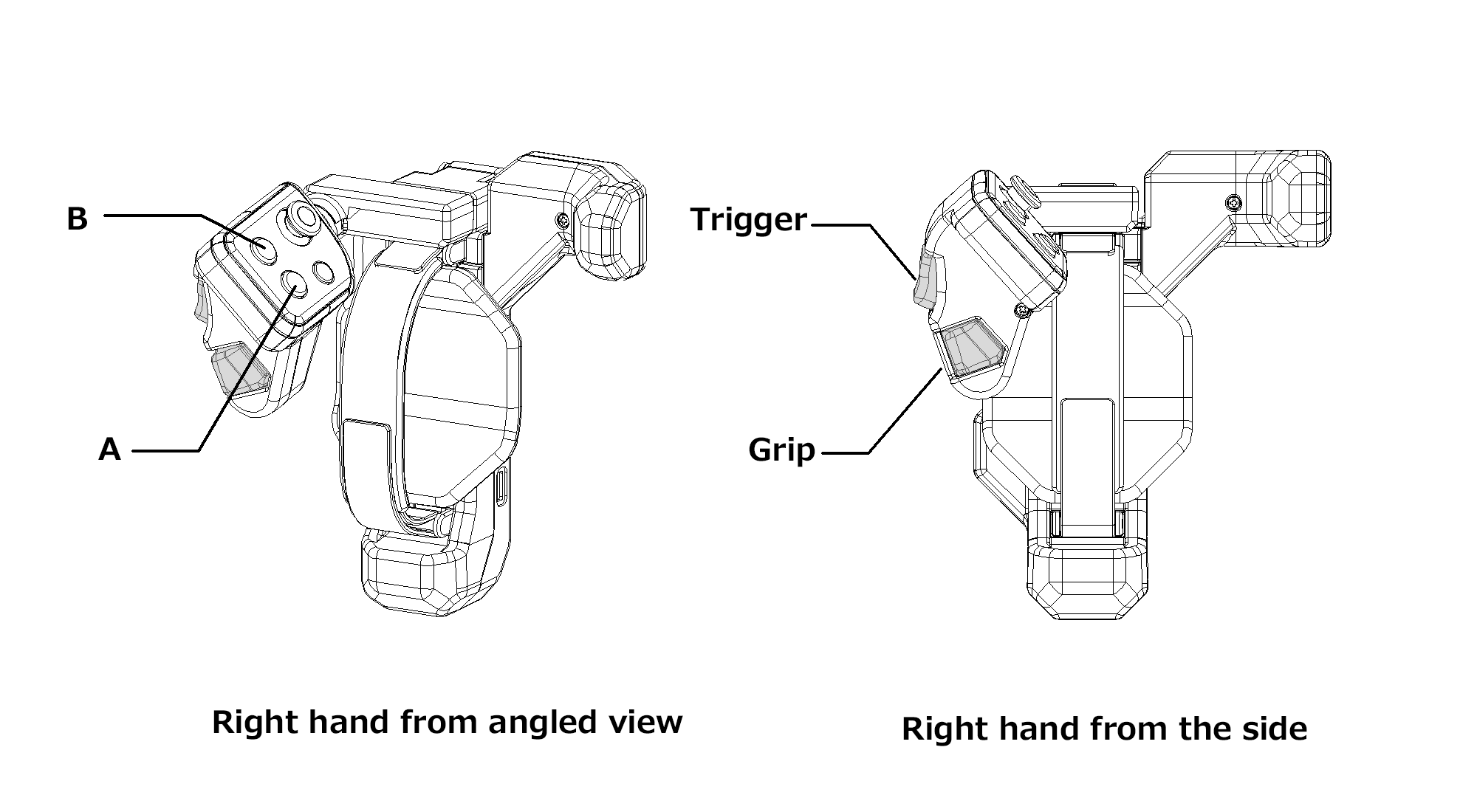
Silly they may seem, they're actually very practical in daily use. They're certainly more practical than some of ShiftAll's bolder innovations. Unfortunately, even though these are advertised as a simple pair of SteamVR compatible lighthouse controllers, in practice, they aren't reliably useful for much of anything besides VRChat.
Unfortunately for me, I spend most of my time in Resonite and FlipVR just doesn't work with it out-of-the-box.
I went down several rabbit holes, trying to figure out what the problem was after filing an issue in Resonite's GitHub. Digging around revealed to me that Resonite seems to be expecting hand skeleton data that's just not being provided for these controllers in SteamVR. This is still a bit confusing to me, as I would expect SteamVR's controller emulation to accomdate this.
Then I remember, "Hey, I'm on Linux. I've been using Monado and that's open source! Why not take a crack at it?"
I spent a little time during the 2025 New Years hacking at Monado a little with the help of Cyro. I don't think either of us would say we're C/C++ experts, but we did manage to poke through Monado enough to find steamvr_lh and its associated code for dealing with Lighthouse devices through SteamVR's driver. With some fiddling, I was able to get the FlipVR controller behaving like an Oculus controller. Sweet! But it was an incomplete hack that just "got the job done". So let's actually try to do this right.
Creating a Monado Extension
While I'd like this to be a full-blown OpenXR extension, we're not there yet. Although ShiftAll has given the blessing to do so. In the meantime we can still extend Monado without having to create an official OpenXR extension. XR_MNDX_ball_on_a_stick_controller.h provided a perfectly good example to work off of.
#ifndef XR_MNDX_FLIPVR_H
#define XR_MNDX_FLIPVR_H 1

#include <openxr/openxr.h>

#ifdef __cplusplus
extern "C" {
#endif

#define XR_MNDX_flipvr 1
#define XR_MNDX_flipvr_SPEC_VERSION 1
#define XR_MNDX_FLIPVR_EXTENSION_NAME "XR_MNDX_flipvr"

#ifdef __cplusplus
}
#endif

#endif
We also have to define all of our input,output, and pose enums in 'xrt_defines.h'. For example, our buttons and thumbsticks:
enum xrt_input_name {
//...all previously defined controller inputs
XRT_INPUT_FLIPVR_A_CLICK = XRT_INPUT_NAME (0x1300 , BOOLEAN ),
XRT_INPUT_FLIPVR_A_TOUCH = XRT_INPUT_NAME (0x1301 , BOOLEAN ),
XRT_INPUT_FLIPVR_B_CLICK = XRT_INPUT_NAME (0X1302 , BOOLEAN ),
XRT_INPUT_FLIPVR_B_TOUCH = XRT_INPUT_NAME (0X1303 , BOOLEAN ),
XRT_INPUT_FLIPVR_X_CLICK = XRT_INPUT_NAME (0X1304 , BOOLEAN ),
XRT_INPUT_FLIPVR_X_TOUCH = XRT_INPUT_NAME (0X1305 , BOOLEAN ),
XRT_INPUT_FLIPVR_Y_CLICK = XRT_INPUT_NAME (0X1306 , BOOLEAN ),
XRT_INPUT_FLIPVR_Y_TOUCH = XRT_INPUT_NAME (0X1307 , BOOLEAN ),
XRT_INPUT_FLIPVR_SYSTEM_CLICK = XRT_INPUT_NAME (0X1308 , BOOLEAN ),
XRT_INPUT_FLIPVR_THUMBSTICK_CLICK = XRT_INPUT_NAME (0X1309 , BOOLEAN ),
XRT_INPUT_FLIPVR_THUMBSTICK_TOUCH = XRT_INPUT_NAME (0X130A , BOOLEAN ),
XRT_INPUT_FLIPVR_THUMBSTICK = XRT_INPUT_NAME (0X130B , VEC2_MINUS_ONE_TO_ONE ),
XRT_INPUT_FLIPVR_TRIGGER_CLICK = XRT_INPUT_NAME (0X130C , BOOLEAN ),
XRT_INPUT_FLIPVR_TRIGGER_TOUCH = XRT_INPUT_NAME (0X130D , BOOLEAN ),
XRT_INPUT_FLIPVR_TRIGGER_VALUE = XRT_INPUT_NAME (0X130E , VEC1_ZERO_TO_ONE ),
XRT_INPUT_FLIPVR_SQUEEZE_CLICK = XRT_INPUT_NAME (0X130F , BOOLEAN ),
XRT_INPUT_FLIPVR_SQUEEZE_VALUE = XRT_INPUT_NAME (0X1310 , VEC1_ZERO_TO_ONE ),
XRT_INPUT_FLIPVR_GRIP_POSE = XRT_INPUT_NAME (0X1311 , POSE ),
XRT_INPUT_FLIPVR_AIM_POSE = XRT_INPUT_NAME (0X1312 , POSE ),
//all future defined controller inputs...
}With these defined, we can add FlipVR controllers to steamvr_lh's controller_classes:
//...
{
"flipvr_controller_vc1b" ,
InputClass {
XRT_DEVICE_FLIPVR ,
{
XRT_INPUT_FLIPVR_GRIP_POSE ,
XRT_INPUT_FLIPVR_AIM_POSE ,
},
{
{"/input/system/click" , XRT_INPUT_FLIPVR_SYSTEM_CLICK },
{"/input/a/click" , XRT_INPUT_FLIPVR_A_CLICK },
{"/input/a/touch" , XRT_INPUT_FLIPVR_A_TOUCH },
{"/input/b/click" , XRT_INPUT_FLIPVR_B_CLICK },
{"/input/b/touch" , XRT_INPUT_FLIPVR_B_TOUCH },
{"/input/x/click" , XRT_INPUT_FLIPVR_X_CLICK },
{"/input/x/touch" , XRT_INPUT_FLIPVR_X_TOUCH },
{"/input/y/click" , XRT_INPUT_FLIPVR_Y_CLICK },
{"/input/y/touch" , XRT_INPUT_FLIPVR_Y_TOUCH },
{"/input/trigger/click" , XRT_INPUT_FLIPVR_TRIGGER_CLICK },
{"/input/trigger/touch" , XRT_INPUT_FLIPVR_TRIGGER_TOUCH },
{"/input/trigger/value" , XRT_INPUT_FLIPVR_TRIGGER_VALUE },
{"/input/grip/value" , XRT_INPUT_FLIPVR_SQUEEZE_VALUE },
{"/input/grip/click" , XRT_INPUT_FLIPVR_SQUEEZE_CLICK },
{"/input/joystick/click" , XRT_INPUT_FLIPVR_THUMBSTICK_CLICK },
{"/input/joystick/touch" , XRT_INPUT_FLIPVR_THUMBSTICK_TOUCH },
{"/input/joystick" , XRT_INPUT_FLIPVR_THUMBSTICK },
},
},
},
//.. 'bindings.json' also needed to be updated to include FlipVR along with a handful of other files to map the inputs to other known controllers (primarily the Quest Touch controllers) so the inputs can actually be used. This was also pretty easy to do, honestly. Setting up the controller and its bindings was a breeze and it didn't take long to get inputs and tracking working just fine.
There were two annoyances though that had to be dealt with.
The Tricky Parts
The FlipVR controllers are, in reality, very simple and straight forward. I have little doubt these were developed using the Tundra Labs Tracker Developer Board since these are also powered by RP2040 microcontrollers. These are effectvely just Lighthouse trackers strapped to your hands with the inputs hooked up and slapped on a hinge. They don't have anything special to detect the flipped state. It's just a vanilla Lighthouse controller made to replicate the inputs of an Oculus Touch controller.
Because of this, FlipVR doesn't require any special binaries or software to act as a driver. Steam's Lighthouse driver works just fine. However, they still won't work out-of-the-box without installing ShiftAll's Controller Driver on Steam. There are no executables included with this driver (except for updating controller firmware), but they do contain a variety of JSON files that define the controller and its inputs/outputs for SteamVR's Lighthouse driver. Without them we will only get positional tracking. None of the inputs will work.
This poses an issue for Monado. When using the 'steamvr_lh' Lighthouse driver, it's only aware of what's available in SteamVR's own drivers directory. ShiftAll's driver is considered an "external" Lighthouse driver that lives in its own directory. The location of external drivers is actually stored at ~/.config/openvr/openvrpaths.vrpath. It's a JSON file and one of the properties is a string array named external_drivers that contains these driver paths. Unfortunately, for now, it's not really clear when and how these paths get used. Not to me anyway. So, until that's figured out and implemented into steamvr_lh, ShiftAll's drivers need to be symlinked to SteamVR's driver directory.
Based on the name property in the ShiftAll driver's driver.vrdrivermanifest, the expected directory name should be shiftall. Sure enough, if we try this (based on default directories):
ln -s ~/.local/share/Steam/steamapps/common/Shiftall\ Controller\ Drivers ~/.local/share/Steam/steamapps/common/SteamVR/drivers/shiftalleverything works as expected! SteamVR treats this just like any other lighthouse device with working buttons and all. As does Monado using steamvr_lh.
That takes care of the inputs but there's another problem. The controls are just not positioned correctly. While the inputs are basically identical to Touch controllers, the shape certainly isn't. It's held (or really, not held) differently in the hand. So how do we fix this? If we look at vive_poses.c there's a couple of interesting switch statements:
//...
switch (input_name ) {
case XRT_INPUT_INDEX_GRIP_POSE :
out_transform_position -> x = 0.f ;
out_transform_position -> y = -0.015f ;
out_transform_position -> z = 0.13f ;
out_transform_rotation -> x = DEG_TO_RAD (15.392f );
out_transform_rotation -> y = DEG_TO_RAD (-2.071f );
out_transform_rotation -> z = DEG_TO_RAD (0.303 );
break ;
case XRT_INPUT_INDEX_AIM_POSE :
out_transform_position -> x = 0.006f ;
out_transform_position -> y = -0.015f ;
out_transform_position -> z = 0.02f ;
out_transform_rotation -> x = DEG_TO_RAD (-40.f );
out_transform_rotation -> y = DEG_TO_RAD (-5.f );
out_transform_rotation -> z = 0.f ;
break ;
default :
* out_transform_position = (struct xrt_vec3 )XRT_VEC3_ZERO ;
* out_transform_rotation = (struct xrt_vec3 )XRT_VEC3_ZERO ;
break ;
}
//... Looks like Index controllers are being detected and position/rotation offsets are applied. Otherwise they just get zeroed out. So I guess I'll add a case here for FlipVR controllers, right? Kind of! I had to start somewhere so I matched FlipVR's case in addition to the Index:
//...
case XRT_INPUT_FLIPVR_GRIP_POSE :
case XRT_INPUT_INDEX_GRIP_POSE :
out_transform_position -> x = 0.f ;
out_transform_position -> y = -0.015f ;
out_transform_position -> z = 0.13f ;
//... As it turns out, FlipVR's offsets are very close to Index controller offsets already. I'm sure these can be refined in the future, but this works perfectly fine for a first pass.
Success!
With those issues cleared, I put out a Merge Request to Monado. As of January 2, 2026, after a good bit of rebasing, the request was accepted and merged into main! 🎉 So now these controllers will just work. If you want to look at full changes, you can see the MR on Freedesktop.org's GitLab.
There's still more to do of course. I want to create a proper OpenXR extension and explicitly support these in xrizer. But for now I'm happy these work at all.